 The DashApply Team
You've got the tab open, the job description is sitting there, and your half-finished cover letter is already making promises you're not sure you can keep. You know the role is close enough to matter, but not close enough to copy-paste your last application and call it a day. That's the exact moment AI job search tools start looking very appealing, and also the moment they can waste your time if you let them write the wrong parts of the process.
The useful question isn't whether AI belongs in your search. It's where it helps, where it muddies the waters, and where a human still needs to make the call. That distinction matters because job applications aren't just writing tasks. They're matching tasks, judgment tasks, and, unfortunately, a little bit of self-control under deadline pressure.
Table of Contents
- The Job-Search Moment That Makes You Reach for AI
- How AI Is Actually Being Used in Job Searches
- Building a Practical AI-Assisted Application Workflow
- The Efficiency Trade-off You Should Not Ignore
- When Automated Screening Feels Unfair or Opaque
- Where to Start and What to Watch Next
The Job-Search Moment That Makes You Reach for AI
You know the scene. A role looks promising, the responsibilities are close enough to your background to be annoying, and the application wants another resume tweak, another summary rewrite, another version of the same story told slightly differently. At some point, your brain stops saying “this is tailoring” and starts saying “this is clerical punishment.”
That's where AI feels tempting. It offers speed, a cleaner first draft, and a way to stop repeating the same edit loop for every posting. Used well, it can shave off the parts of the process that drain energy without adding much value. Used badly, it turns your application into polished mush.
The real decision isn't all or nothing
A lot of people still talk about AI in job search as if the choice is between pure manual effort and total automation. That's the wrong frame. The practical version is more selective, use AI for the repetitive pieces, then keep the parts that need judgment, proof, and tone under your control.
Practical rule: If the task involves repeating yourself, AI may help. If the task involves proving you did something, you need to stay in the loop.
That distinction is what separates a useful workflow from a noisy one. A job seeker can absolutely use AI to speed up drafting, spotting keyword gaps, or reorganizing a resume. But once the tool starts inventing phrasing that sounds confident without being grounded, it's no longer helping you apply, it's helping you confuse yourself.
The point of this guide is simple. Treat AI like an assistant sitting next to you, not like a substitute sitting in your chair.
How AI Is Actually Being Used in Job Searches
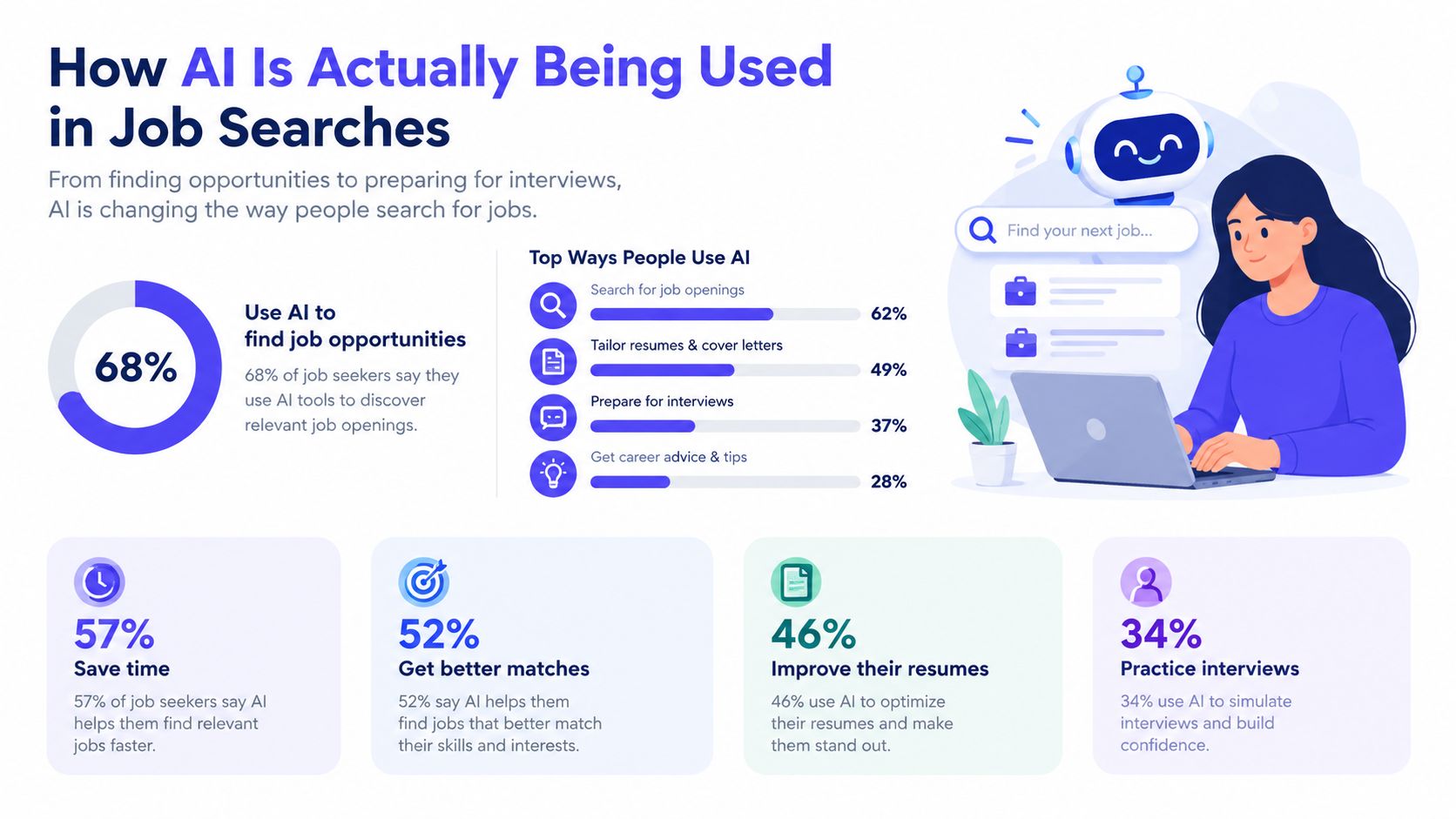
The most revealing thing about current AI job search behavior is that people trust it more for writing than for discovery. In a 2025 iHire survey, 29.3% of candidates said they had used AI in the previous year to write or customize a resume or cover letter, up from 17.3% in 2024. That's roughly 69% relative growth in one year, which is a very fast shift for something that used to feel niche. The same survey found that only 6.9% of job seekers had started using generative-AI platforms such as ChatGPT to look for roles, which tells you where the comfort level still sits. iHire's employer recruiting survey summary
The pattern makes sense. People reach for AI first when the task is repetitive, document-centered, and easy to edit. Resume tailoring feels more controllable than relying on a model to find openings, because you can inspect the output line by line. Discovery is messier. A search tool has to decide what counts as relevant, and most job seekers still prefer familiar channels for that part of the hunt.
Usage is broad, but not evenly distributed
A January 2025 survey of 5,300 French job hunters found that 77% had used AI while looking for work. Usage was 83% among respondents younger than 25 and 69% among people older than 50, so age clearly shapes comfort even when adoption is widespread. Education matters too. 61% of applicants with a master's degree said they felt comfortable using AI to obtain job information, compared with 34% of respondents whose highest qualification was secondary education. The French survey summary from Employ Inc.
That matters for product design and for personal workflow. A candidate who already knows how to read a posting, identify hard requirements, and judge whether a tool is hallucinating will use AI differently from someone who just wants a quick rewrite. The first group can push the tool further. The second group needs clearer guardrails.
AI job search is already mainstream for application prep, but it still behaves like a support tool, not a replacement for judgment.
The practical takeaway is that candidates are not adopting AI everywhere at once. They're starting with the parts that feel tedious and low-risk, then expanding only if the output stays usable. That's the pattern worth copying.
Building a Practical AI-Assisted Application Workflow
The cleanest workflow starts with the job description, not the tool. Read the posting once for meaning, then again with a pen, a cursor, or a highlighter in hand. Mark the hard skills, repeated phrases, named tools, and anything the employer frames as mandatory instead of merely nice to have.
Match before you rewrite
Once you've marked the posting, compare it to your actual experience. If the gap is small, you're probably looking at wording changes, not a full rewrite. If the gap is large, the honest move may be to skip the role rather than stretch yourself into someone else's résumé on paper.
A tool like DashApply fits naturally in this situation. It analyzes a job description, compares it with your real experience, and shows missing skills or keywords along with a match score. You still review and edit everything before downloading or submitting, which is exactly how it should work. It's free during early launch and doesn't require a credit card, so it's useful as a test bench rather than a commitment trap.
Rewrite with evidence, not decoration
The strongest AI-assisted resume edits don't sound flashy. They sound specific. If the posting asks for stakeholder coordination, your resume should point to actual cross-functional work. If it asks for forecasting or campaign measurement, your bullets should show how you did that, with tools and outcomes that you can defend in an interview.
A quick way to keep yourself honest is to ask one question after every AI suggestion, “Could I explain this clearly to a recruiter without checking notes?” If the answer is no, it's probably too vague.
Useful filter: If the draft sounds better but becomes harder to verify, it's probably worse, not better.
Cover letters deserve the same treatment. AI can get you from blank page to rough draft in minutes, but the final version should still sound like you and include one concrete detail that came from your experience, not from generic role language. That's the difference between a personalized application and an application-shaped fog machine.
The Efficiency Trade-off You Should Not Ignore
Speed is the selling point, but speed isn't free. A World Bank presentation summarizing recent labor-market experiments reports that giving applicants access to generative AI reduced recruiter screening accuracy by 4% to 9%, although accuracy improved for non-native English speakers. That's the central trade-off: AI can make applications faster and cleaner, while also making it harder for recruiters to tell who really fits a role. World Bank presentation on labor-market experiments
When lots of candidates use the same kind of writing assistance, surface polish stops being a reliable signal. A recruiter who reads a stack of similarly smoothed-out cover letters starts losing the ability to tell the difference between a strong fit and a generic one. That doesn't mean you should avoid AI entirely. It means the output has to carry more factual weight.
What good automation should preserve
A decent workflow should do three things at once. It should connect each job requirement to a concrete accomplishment, preserve your factual voice, and flag anything unsupported for human review. That gives you a document that still feels like a person wrote it, which is the point.
If a claim can't survive an interview question, it doesn't belong in the draft. That's especially true in application documents, where a polished sentence can look harmless right up until someone asks you to explain it live. The shortcut then becomes a liability.
For readers who want a deeper look at the risk of overdoing this, there's a useful discussion in the case against auto-applying to jobs. The broader lesson is simple. Automation should reduce repetition, not erase the evidence that makes you credible.
When Automated Screening Feels Unfair or Opaque
A lot of job-search advice assumes the system is clumsy but basically fair if you optimize hard enough. That assumption breaks down fast when screening is opaque. Stanford researchers followed 3.4 million people submitting 4 million applications to 1,700 postings across 150 employers and 11 industries. They found that 26% of Black applicants and 15% of Asian applicants applied to positions where the hiring AI discriminated against their racial group. Stanford HAI on AI hiring tools
The same research warns about systemic rejection, which is the ugly version of scale. If several employers use the same screening logic, one flawed filter can shut a candidate out again and again. That's not a resume-writing problem. It's a screening-system problem.
What to do when the process feels off
First, review every AI-assisted application yourself before you send it. That sounds obvious, but it's the easiest step to skip when you're tired and chasing momentum. Second, keep everything truthful and verifiable. If the system is biased, a more polished falsehood won't rescue you. Third, pay attention to whether employers disclose automated tools at all.
That disclosure gap is real. In candidate survey evidence cited in the Stanford material, 68.5% of applicants who believed they were rejected by AI said the use of AI was not disclosed, while only 9.7% said they were clearly told. That's a huge difference between what candidates experience and what employers explain.
New York City's Local Law 144 adds another layer. Employers and employment agencies can't use an automated employment decision tool unless it has undergone a bias audit within one year of use, the audit information is publicly available, and required notices are provided to candidates. The city also allows complaints if those steps aren't completed. NYC's automated employment decision tools page
If you suspect screening is working against you, document the pattern, ask for human review where it's available, and vary your application channels without hiding who you are. For a closer look at how candidates think about detection and disclosure, see this discussion of AI-written resume detection. A smarter application workflow can improve your odds, but it can't fix a broken gatekeeper by itself.
Where to Start and What to Watch Next
If you're new to this, don't try to automate your whole search on day one. Pick one tedious part of the process and test AI there first. Tailoring resumes, spotting missing keywords, and tracking follow-ups are the most obvious places to start because they're repetitive and easy to review.
A simple rhythm works better than a complicated system.
- Match: Compare the job post against your experience and note the gaps.
- Review: Edit any AI-generated draft until it sounds like you and includes evidence you can explain.
- Submit: Send the application through the right channel and save a record.
- Track: Watch which roles get responses so you can adjust instead of guessing.
That last step matters more than most candidates acknowledge. In August 2026, the U.S. labor market recorded about 7.1 million job openings, 5.2 million hires, and 5.1 million total separations. The job-openings rate was 4.3%, while the hires rate was 3.3%. BLS JOLTS release Those numbers are a useful reminder that an open role is not a hire, and a submitted resume is only one step in a longer funnel.
Keep that in mind when you're tempted to treat AI like an autopilot. The people who get value from these tools are the ones who stay honest, edit carefully, and track what happens after they hit submit. If one practical next step would help, take your current resume, pair it with one role you actually want, and let DashApply show you the missing skills and keywords before you rewrite from scratch.
If you want a cleaner way to tailor applications without losing control of the details, visit DashApply. It helps you compare a role against your real experience, tighten ATS-friendly resumes, and keep track of what you've sent without turning the whole thing into a guessing game.