 The DashApply Team
ATS integration is the connection that lets your application data, including your resume, answers, and status, move from where you apply into an employer's recruiting system in a standardized way. A 2026 market review found 181 ATS products, but only 93, or 51%, published an API, while 82, or 45%, had neither a public API nor an MCP server. The Unified ATS overview shows why “integrated” rarely means one universal connection.
You spend twenty minutes tailoring your resume, another ten entering the same dates and job titles into an application form, then click Submit. The page spins. Maybe you get an email. Maybe you get a cheerful “thanks” and never see another update. The hiring process can feel like posting your documents through a letterbox with no idea whether there's a room on the other side.
That's the candidate-facing side of ATS integration. It determines how your information travels, how the employer's system stores it, whether your resume is parsed correctly, and whether your application status can be confirmed. It won't make an unsuitable application suitable, but understanding the plumbing can prevent avoidable mistakes.
Table of Contents
- The Black Box Moment in Your Job Search
- What ATS Integration Actually Means
- How Resume Parsing Transforms Your Application
- Keyword Matching Versus Semantic Analysis
- How DashApply Handles ATS Integration
- The Hidden Risks of Automated Screening
- What to Do Next with Your Applications
The Black Box Moment in Your Job Search
You apply for a marketing operations role through a company career page. The form asks for your name, email address, employment history, education, salary expectations, and resume upload. You fill everything in, even though the resume already contains most of it, because apparently software still enjoys asking twice.
After submission, the employer's applicant tracking system, or ATS, should create or update a candidate record and associate it with that specific job. The resume may become an attachment, while your dates, titles, skills, and answers become separate searchable fields. A recruiter can then filter profiles, move applications through stages, add notes, and send updates from the same system.
That's the simple version. The practical version depends on how the career page, application form, job board, resume parser, and ATS communicate. Some systems exchange data through APIs, webhooks, marketplace connectors, or integration platforms. Others offer limited connections, so a document uploads successfully while a structured field remains blank.
Practical rule: A successful upload proves that a file moved. It doesn't prove that every important field was understood or that a recruiter has reviewed your application.
ATS adoption is especially common among large employers. Jobscan's 2025 review detected an ATS on 489 of 500 Fortune 500 career pages, or 97.8%, as reported in the employer ATS research review. The same source cites an HR.com survey in which 66% of participating HR professionals used an ATS in 2024-25, while only 45% rated their overall talent-acquisition technology stack as good or excellent.
So, what is ATS integration in plain English? It's the set of connections that moves approved hiring data between systems and keeps the records aligned. For you, that means your application isn't just a PDF. It's a collection of information that software must receive, interpret, store, and pass through a hiring workflow.
What ATS Integration Actually Means
Think of an application as several pieces traveling together:
- Your profile data, such as name, contact details, location, work authorization, and answers to required questions.
- Your resume and other documents, usually uploaded as PDF or DOCX files.
- The job-specific application, which links your information to one particular opening.
- Workflow updates, such as submitted, screening, interview, rejected, or advanced.
- Recruiter activity, including notes, scorecards, attachments, and interview information.
A true ATS integration allows approved data to move between systems with authentication, field mapping, and defined permissions. A basic upload is narrower. You select a file, the employer's system stores it, and the ATS may or may not extract the content into searchable fields.
Greenhouse's API documentation describes integrations that can access and update candidate information, attachments, and application stages. That means an authorized connection may read data, create a record, upload a resume, update fields, or change a stage. It doesn't mean every outside tool can perform every action, and it certainly doesn't mean an application can bypass the employer's questions or consent screens.
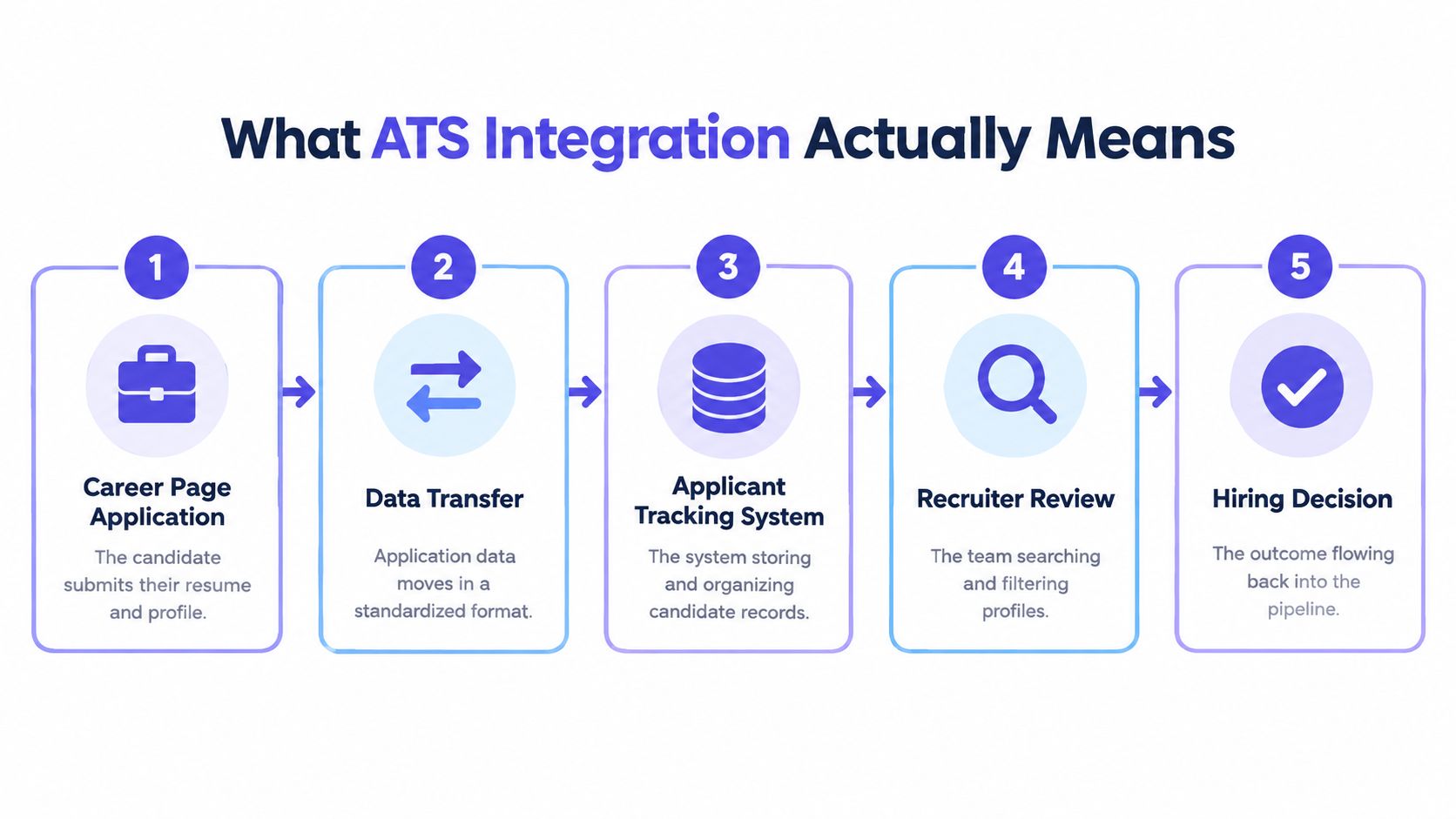
A typical flow looks like this:
- Career page application: You submit your resume and complete required fields.
- Data transfer: The form sends information in a format the employer's systems can process.
- ATS record: The system stores your candidate profile and connects it to the role.
- Recruiter review: Hiring staff search, filter, compare, and move applications through stages.
- Hiring decision: The outcome is recorded in the recruiting workflow and may trigger a message.
The important distinction is where responsibility ends. A job application workspace can help you prepare a clean resume, identify relevant gaps, and organize follow-ups. The employer's ATS remains the system that receives the final application and controls its internal workflow.
A connection also has limits. Systems can use different field names, permissions, update speeds, and application steps. “Integrated” usually means specific approved data can move reliably, not that every feature behaves identically across every employer.
How Resume Parsing Transforms Your Application
Your resume is designed for a person. An ATS often receives it as a document that must be converted into structured fields. That process is called resume parsing.
A parser extracts text from a PDF or DOCX file, identifies entities such as contact details, job titles, employers, dates, skills, education, and certifications, then maps those entities into a schema. The ATS can search and filter the structured fields more easily than it can interpret a page visually. Workable's features documentation describes automatic extraction and anonymization of key resume details into searchable data fields.
Good parsing may use OCR for image-based documents, natural language processing for semantic extraction, skill and title taxonomies, and validation rules for dates, duplicates, locations, and inconsistent company names. That sounds advanced, and sometimes it is. It still has the temperament of a printer driver.
A parser can misread a two-column resume by placing the right-hand content between the wrong jobs. A decorative timeline can turn employment dates into isolated numbers. Text inside an image may disappear completely. A header with your phone number and email address can be treated as a graphic rather than contact information.

What parsing errors look like
Suppose your resume shows:
- Marketing Manager, Northstar, 2021 to present
- Operations Coordinator, Fieldwell, 2018 to 2021
If the layout uses columns and the parser reads the dates before the corresponding employers, the ATS might attach 2018 to 2021 to the wrong role. A recruiter could see a broken timeline, even though your original document looks polished.
Another common failure involves skills. “Customer relationship management” might appear in a graphic skills bar, while the job description asks for “CRM.” If the graphic isn't extracted, the system has no reliable evidence that you've used the tool.
Use clear section headings, readable text, conventional date formats, and a logical employment history. A single-column layout with ordinary bullets is less exciting than a designer template, but your resume is not auditioning for a poster exhibition. You can use DashApply's ATS resume formatting tool to check structure, then review every generated detail before downloading.
Keep the source content, structured version, final document, and submitted version distinct. Before applying, verify your name, contact information, dates, job titles, employers, and required answers. The exact file sent matters if you later need to correct an error or confirm what the employer received.
Keyword Matching Versus Semantic Analysis
Some screening systems look for exact terms. Others try to interpret relationships between skills, responsibilities, and experience. Many applicants treat these approaches as interchangeable, then wonder why stuffing a job description into a resume produces a document that sounds like it was assembled by a committee of autocomplete tools.
Keyword matching is literal. If a posting requests “pipeline management,” the system may search for that phrase or a closely related field. If your resume says “managed sales opportunities from qualification through close,” a basic matcher might not connect the two.
Semantic analysis looks beyond exact wording. Workable's guide to its AI features describes resume parsing, job-description comparison, match scores, and explanations of the skills or experience influencing a ranking. Semantic tools may recognize that related phrases describe similar work, but they still need clear evidence.
| Approach | What it can notice | What you should do |
|---|---|---|
| Exact keyword matching | The same skill, title, platform, or phrase used in the posting | Use accurate job-specific terms when they genuinely describe your work |
| Semantic analysis | Related meaning across responsibilities, skills, and experience | Explain the work clearly and name relevant tools or methods in standard language |
| Human review | Context, judgment, progression, and unusual career paths | Make every claim specific enough for a recruiter to verify |
The practical answer isn't to copy the job description. It's to translate your real experience into language the employer uses where that language is accurate.
For example, if you've managed a sales pipeline in Salesforce, write Salesforce pipeline management rather than hoping “kept opportunities moving” will be interpreted correctly. If you've built monthly forecasts, say sales forecasting when that's truthful. Then support the term with a bullet explaining what you owned, who relied on the work, or what changed.
A missing exact phrase doesn't prove that an ATS will reject you. A keyword list isn't a guaranteed pass either. Use DashApply's free job description keyword finder as a prompt for review, not as permission to add skills you haven't used.
Career switchers need particular care here. A former account manager may have genuine project coordination experience without having held the title “Project Manager.” Keep the original title, describe the transferable work, and avoid replacing an accurate history with a more convenient label.
How DashApply Handles ATS Integration
DashApply sits on the preparation side of the process. It helps you format an ATS-friendly resume, tailor it to a specific job using your real experience, identify missing skills and keywords, generate a match score, track roles and follow-ups, and browse active jobs.
The workflow starts with an imported resume or profile. You add a target job description, then review how the role's requirements relate to your background. If the role asks for CRM reporting, stakeholder communication, and process improvement, the useful output isn't a pile of repeated phrases. It's a clearer view of which parts of your experience support those requirements and which areas need attention.
The candidate remains responsible for the final application.
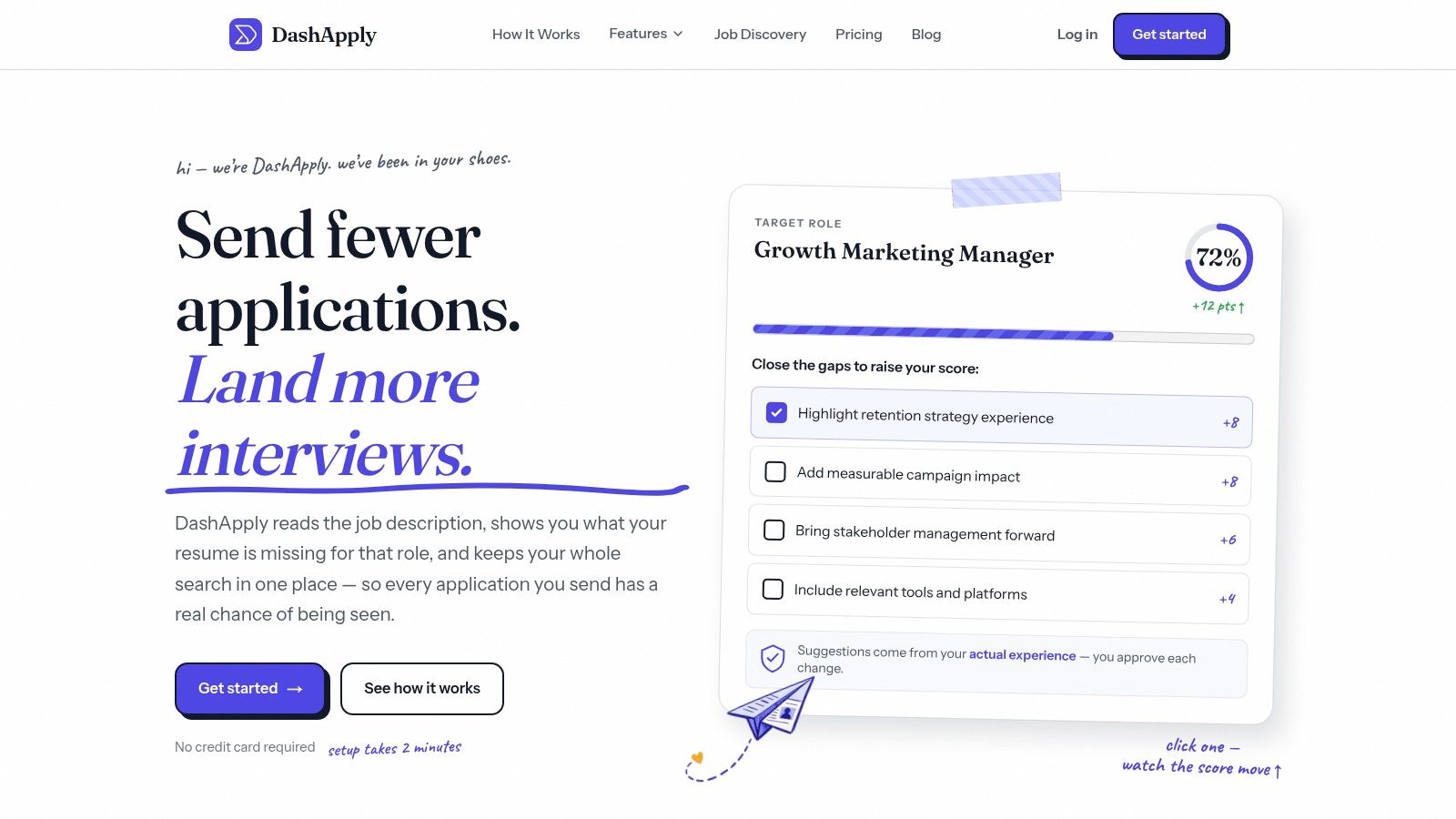
A review-first workflow
A sensible pass through the workspace looks like this:
- Import: Bring in your existing resume or build a profile from scratch.
- Compare: Add the target job description and inspect the suggested skills, keywords, and match score.
- Tailor: Adjust bullets so your strongest, verifiable experience appears in relevant language.
- Check: Review dates, titles, employers, contact information, and formatting.
- Approve: Edit or reject anything that doesn't accurately represent your background.
- Download: Save the final document and use it in the employer's application flow.
- Track: Record the role, submission status, and follow-up date in your dashboard.
ATS-friendly writing can go wrong when automation becomes the author. A suggestion that sounds plausible may still overstate your responsibility. A missing keyword may reflect a wording gap, or it may be irrelevant to your actual work. You should be able to trace every claim back to your experience.
DashApply does not submit applications for you. It helps on the preparation and organization side, while you review materials and submit through the employer's own process. DashApply offers a free trial, then continues as a paid product.
The useful boundary is clear: DashApply can help prepare the resume and organize the search, but it isn't the employer's ATS and can't confirm that a company received, parsed, or advanced an application. Check the employer's confirmation page or email, save the submitted version, and treat inferred status as unconfirmed.
The Hidden Risks of Automated Screening
ATS integration affects more than speed. It also affects fairness, privacy, and accountability.
Research on algorithmic hiring identifies risks including contextual blindness, historical-data bias, reducing complex decisions to narrow metrics, and limited transparency, as discussed in research on algorithmic hiring risks. A parser may correctly extract a job title while missing the context that makes a career switcher qualified. A ranking system may reward familiar career patterns and undervalue nonlinear experience.
That creates a difficult trade-off. Tailoring a resume with standard terms can make genuine experience easier to find. Tailoring it too aggressively can flatten your background into a list of screening tokens and reinforce criteria that don't capture your ability.
Candidates need a correction path
The risk is higher when your information passes through several systems. Your resume, application answers, interview status, and activity history may each have different access and retention rules. You should know what you're submitting, where it's going, and whether a status is confirmed or merely inferred.
Look for practical safeguards:
- Least-privilege access: A connection should have only the permissions it needs.
- Clear field mapping: You should know whether a value becomes a profile field, an attachment, or an answer.
- Audit trails: Systems should preserve meaningful records of changes and submissions.
- Human review: Automated suggestions need an approval step before they become claims.
- Reversibility: You should be able to correct or remove an error where the workflow permits it.
Automation should reduce repetitive work, not remove your ability to inspect the result.
This is particularly important for international applicants, people returning after a career break, and professionals moving between functions. Keep your original titles and explain transferable responsibilities rather than disguising the path. A clean parser result is not worth a misleading resume.
What to Do Next with Your Applications
Understanding ATS integration changes the task from “beat the robot” to make accurate qualifications legible. You need a resume that a parser can extract and a recruiter can understand, followed by an application record that contains the required information in the employer's own workflow.
Use this quick check before submitting:
- Read the job description for genuine requirements. Separate required tools and responsibilities from generic language.
- Compare those requirements with your actual experience. Keep a skill only when you can explain where and how you used it.
- Simplify the document. Use readable headings, conventional dates, text-based content, and a logical order.
- Inspect the application fields. Don't assume the uploaded resume filled every required answer.
- Save the final version. Keep the exact document and answers you submitted.
- Confirm the submission. Save the employer's confirmation email or page, and don't treat a dashboard status as proof unless it's connected to the employer's system.
A match score can reveal a wording gap, but it can't decide whether a role is right for you. A keyword can improve findability, but it can't replace evidence. And an ATS can organize a candidate record without understanding the full person behind it.
Pick one active role today, add its description to DashApply, and inspect the suggested gaps. Keep only changes that are accurate, review the complete resume and application answers, then submit through the employer's stated process.
DashApply helps you format ATS-friendly resumes, tailor them to real job requirements, review missing skills and keywords with a match score, and track applications and follow-ups. Visit DashApply, prepare one role-specific version, and check every field before you send it.